Why React Suspense Will Be a Game Changer
A less technical and more conceptual in-depth overview of React Suspense and our mental model of loading states.

I don’t want to dig too deep into the technical details of React Suspense and how it works under the hood, there are already plenty great blog posts, videos and conference talks out there that do that. Instead I want to focus more on the impact Suspense will have on us application developers in the way we think about loading states and architecture our apps.
Still, a brief technical introduction
To get everyone who hasn’t heard about Suspense or doesn’t really know what it is on board, I still want to give at least a summary of what all this fuzz is about.
Introduced at JSConf Iceland by Dan Abramov last year, Suspense was pitched as an improvement to the developer experience when dealing with asynchronous data fetching within React apps. This is a huge deal, because everyone who is building dynamic web applications knows that this is still one of the major pain points and one of the things that brings huge boilerplates with it.
Suspense is also supposed to transform the way we think about loading states, which shouldn’t be coupled to the fetching component or data source, but rather a UI concern. Our apps should show spinners where it makes most sense in context of the user experience. Suspense helps doing so by decoupling these concerns for us.
This goes beyond API data fetching and can be applied to any async data flow, e.g. code splitting or assets loading.
React.lazyin combination with the
Suspensecomponent already made it into the latest React stable release, allowing easy code splitting for dynamic imports without having to manually handle the loading state. The fully featured Suspense functionality that includes data fetching will have to wait until later this year, but you can already experiment with it through current alpha releases.
The general idea is to allow components to “suspend” their render, e.g. if they need extra data loaded from external sources. Once all the information is there, React will re-try to render the component.
To achieve this, React uses Promises. A component can throw a Promise in its render method (or anything that is called during the component’s render, e.g. the new static
getDerivedStateFromProps). React catches the thrown Promise and looks for the closest
Suspensecomponent up the tree, which acts as a sort of boundary. The
Suspensecomponent takes an element as its
fallbackprop, which will be rendered while any children in its subtree are suspended, no matter where or why.
React also keeps track of the thrown Promise. Once it resolves, another attempt of rendering the component is made. This assumes that since the Promise is resolved, the suspended component now has all the information it needs to properly render. For that, we use some form of cache where the data is stored. This cache essentially determines on every render whether the data is already available (then it just reads it like from a variable) or not, in which case it triggers the fetch and throws the resulting Promise for React to catch. As mentioned this is not exclusive to data fetching, any async action that can be described using Promises can make use of it, code splitting being a very obvious and popular example.
The core concept is very similar to error boundaries, which were introduced in React 16 to allow catching uncaught exceptions anywhere within the app by, again, placing components (in this case any component with a
componentDidCatchlifecycle method) in your tree to handle everything that gets thrown up from below them. In the same way, the
Suspensecomponent catches any thrown Promises from its children, with the difference that for Suspense we don’t have to make a custom component to act as a boundary, the
Suspensecomponent is that boundary, letting us defined the fallback that should be rendered (as well as some additional things, that we’ll touch on later).
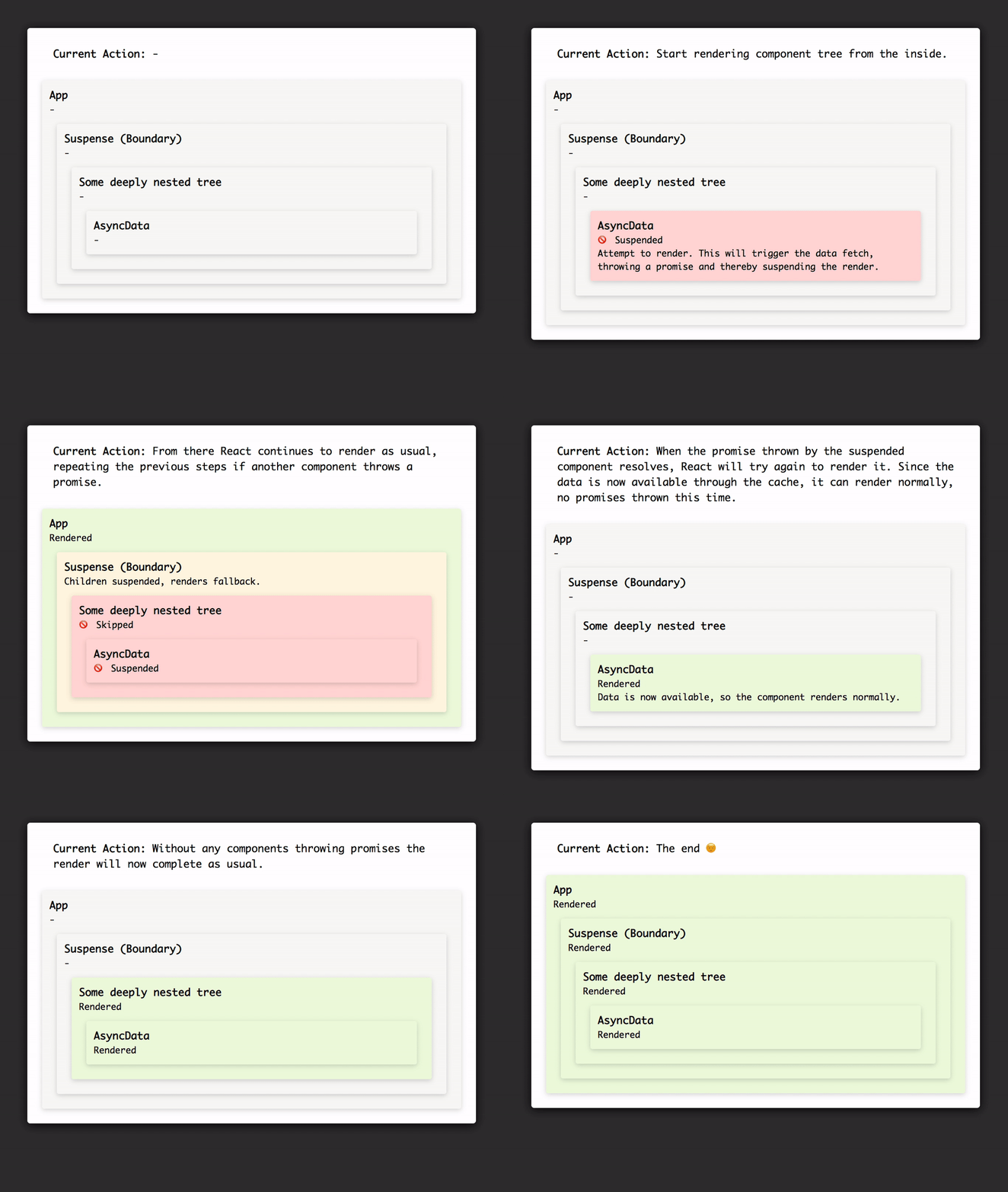
Very simplified visualisation of how Suspense affects the rendering of your component tree, see https://codesandbox.io/s/pk79xvxq20 for interactive demo.
This whole approach dramatically simplifies the way we will think about application loading states and aligns our mental model as developers more with the one of UX and UI designers.
Designers usually don’t think about data sources, but more of logical groups and information hierarchy within an interface or application. And you know who else doesn’t care about the source of your data? Users. No one likes an app with thousands of independent loading spinners, some of them only flashing for milliseconds, with the content of the page jumping up and down while the data requests resolve.
So why is this so ground breaking?
The problem
To understand what the game changer is, let’s take a look at how we currently deal with data fetching in our apps.
The most primitive approach is by storing all required information in local state, which could look something like this:
class DynamicData extends Component {
  state = {
    loading: true,
    error: null,
    data: null,
  };

  componentDidMount() {
    fetchData(this.props.id)
      .then((data) => {
        this.setState({
          loading: false,
          data,
        });
      })
      .catch((error) => {
        this.setState({
          loading: false,
          error: error.message,
        });
      });
  }

  componentDidUpdate(prevProps) {
    if (this.props.id !== prevProps.id) {
      this.setState({ loading: true }, () => {
        fetchData(this.props.id)
          .then((data) => {
            this.setState({
              loading: false,
              data,
            });
          })
          .catch((error) => {
            this.setState({
              loading: false,
              error: error.message,
            });
          });
      });
    }
  }

  render() {
    const { loading, error, data } = this.state;
    return loading ? (
      <p>Loading...</p>
    ) : error ? (
      <p>Error: {error}</p>
    ) : (
      <p>Data loaded 🎉</p>
    );
  }
}
Pretty verbose, huh?
We fetch the data on mount and store it in local state. Additionally we keep track of errors and loading state through local state as well. Does that look familiar? Even if you are not using state but instead maybe even some kind of abstraction, very likely you still have a lot of those
loadingternaries scattered across your app.
I wouldn’t say this approach is bad per se (it will serve the need for simple use cases, plus we can obviously easily optimise it, e.g. pulling the actual fetch into a separate method for a start), but it doesn’t scale well and the developer experience could definitely be better. To be more specific, I see the following issues with it:
- 👎 Ugly ternaries → bad DX: Loading and error states are defined via ternaries in the render, making the code unnecessarily convoluted. We’re not describing one render function, we’re describing three.
- 👎 Boilerplate → bad DX: Handling all of this state comes with a lot of boilerplate: triggering the fetch on mount, updating loading state and storing data in state on success or storing the error on failure. We would need to repeat this for every other component that uses external data.
- 👎 Confined data and loading state → bad DX & UX: The state is handled and stored within the component, which means we will end up with a million spinners in our app, as well as making multiple unnecessary API calls to the same endpoints if we have different components relying on the same data. This comes back to the point I made earlier, that the mental model of making loading states depend on the data source doesn’t seem right. Through this approach, the loading state is coupled to the data fetching and its component, which limits us to deal with it within this component (or finding cheats to hack around it) instead of being able to handle it in a broader context of the application.
- 👎 Re-fetching data → bad DX: Changing ids that i.e. would need to trigger a re-fetch of the data are verbose to implement. We’ll have to do the initial fetch in componentDidMount and additionally to check if the id changes in componentDidUpdate.
- 👎 Flashing spinners → bad UX: If the users internet connection is fast enough, showing the loading spinner for just a few milliseconds is even worse than showing nothing at all, making your app feel janky and slower. Perceived performance is key.
Can you see the pattern? To many it may not come as a surprise, but to me it was never really that clear how hand-in-hand developer and user experience actually go.
So, having identified the problems, how do we solve them?
Introducing Context
For a long time Redux has been the go to solution for a lot of these problems. With the “new” Context API in React 16 we got another great tool to help us define and expose data on a global level while making it easily accessible in a deeply nested component tree. So for the sake of simplicity we’ll go with the latter here.
First off, we can easily pull out all the information we previously stored in local state into a context provider, which will allow us to share it with other components. We can also expose a method to fetch data through this provider, so that our components only need trigger this method and read the loaded information via a context consumer. The recently in React 16.6 released contextType
makes this even more elegant and less verbose.
The provider also functions as a form of cache, preventing us from hitting the same endpoint multiple times if the data is already there or loading, e.g. triggered by another component.
const DataContext = React.createContext();

class DataContextProvider extends Component {
  // We want to be able to store multiple sources in the provider,
  // so we store an object with unique keys for each data set +
  // loading state
  state = {
    data: {},
    fetch: this.fetch.bind(this),
  };

  fetch(key) {
    if (this.state[key] && (this.state[key].data || this.state[key].loading)) {
      // Data is either already loaded or loading, so no need to fetch!
      return;
    }

    this.setState(
      {
        [key]: {
          loading: true,
          error: null,
          data: null,
        },
      },
      () => {
        fetchData(key)
          .then((data) => {
            this.setState({
              [key]: {
                loading: false,
                data,
              },
            });
          })
          .catch((e) => {
            this.setState({
              [key]: {
                loading: false,
                error: e.message,
              },
            });
          });
      },
    );
  }

  render() {
    return <DataContext.Provider value={this.state} {...this.props} />;
  }
}

class DynamicData extends Component {
  static contextType = DataContext;

  componentDidMount() {
    this.context.fetch(this.props.id);
  }

  componentDidUpdate(prevProps) {
    if (this.props.id !== prevProps.id) {
      this.context.fetch(this.props.id);
    }
  }

  render() {
    const { id } = this.props;
    const { data } = this.context;

    const idData = data[id];

    return idData.loading ? (
      <p>Loading...</p>
    ) : idData.error ? (
      <p>Error: {idData.error}</p>
    ) : (
      <p>Data loaded 🎉</p>
    );
  }
}
We could even try to remove the ternary within the component. Let’s say we’d want the loading spinner higher up in the tree, covering more than just this component. Now that we have the loading state in the context, we can simply access it where we want and show a loading spinner there instead, right?
This is still problematic, since the
AsyncDatacomponent needs to be rendered in order to trigger the data fetch in the first place. Sure, we could hoist up the fetch as well, somewhere higher up the tree, instead of triggering it in the component, but that doesn’t really solve the problem, it just moves it somewhere else. It’s also bad for code readability and maintainability, suddenly
AsyncDatarelies on some other component doing the data loading for it. This dependency is neither clear nor good. Ideally your components can work as much as possible in isolation, so you can place them anywhere without relying on other components being in specific spots in the component tree around them.
But at least now we have all the data and loading states in one central place, which is an improvement. And since we’re able to place the provider anywhere, we can consume this information and functionality from wherever we want, meaning that other components can utilise it (no redundant code anymore) and can reuse already loaded data, eliminating unnecessary API calls.
To put this into perspective, let’s have a look at our initial issues again:
- 👎 Ugly ternaries: Nothing changed here, all we can do now is move the ternaries somewhere else, which doesn’t really solve the DX problem.
- 👍 Boilerplate: We removed all the boilerplate that was required before. We only have to trigger the fetch and read the data and loading state from the context, leading to way less repetitive code, which in turn leads to better readability and maintainability of what‘s left.
- 👍 Confined data and loading state: We now have a global state that can be accessed anywhere in the application. So we improved the situation significantly, but weren’t able to solve all the issues: loading states are still coupled to the data source, also (even if we find a cheat around these dependencies) if we want to show a loading state depending on multiple components loading their respective information, we still have to explicitly know which sources that are and manually check for all the individual loading states.
- 👎 Re-fetching data: Nothing changed here…
- 👎 Flashing spinners: Here neither…
I think we can all agree that this is still a solid improvement, but it leaves some of the problems unsolved.
Suspense to the rescue
How can we do better by using Suspense?
For one, we can get rid of the context, the data handling and caching will be done by a cache provider, which really could be anything. Context, local storage, a window object (even Redux if you really wanted to), you name it. All this provider does is basically storing the information we request. On every request, it checks first whether the information is already stored. If so, return it. If not, fetch the data, and throw the Promise. Before resolving the Promise, it stores the loaded information in whatever it uses for the cache, so that when React triggers the re-render, everything is available. That’s it. Obviously it gets more complex with more complex use cases, considering things like cache invalidation and SSR, but this is the general gist of it.
This caching functionality is also one of the reasons why Suspense for data fetching still hasn’t made it into stable React yet. If you want to have a sneak peak, the experimental package called react-cache
is available to play around with. But be aware that in its early stage the API will definitely change and a lot of common use cases are not yet covered.
All that aside, we can also get rid of all the loading state ternaries. Even more, instead of fetching on component mount and update, suspense works by conditionally fetching in the render, suspending it if the data is not already available through the cache. This might seem like an anti-pattern at first (after all we’ve always been told not to do this), but it makes a lot of sense considering that if the data is in the cache, the provider will simply return it and the render gets executed as normal.
import createResource from './magical-cache-provider';
const dataResource = createResource((id) => fetchData(id));

class DynamicData extends Component {
  render() {
    const data = dataResource.read(this.props.id);
    return <p>Data loaded 🎉</p>;
  }
}
Finally we can place the boundaries and define the fallback component we want to render while the data is fetching. Where? Anywhere we want. As explained before, these boundaries will catch any thrown Promises bubbling up from below them in the tree.
class App extends Component {
  render() {
    return (
      <Suspense fallback={<p>Loading...</p>}>
        <DeepNesting>
          <ThereMightBeSeveralAsyncComponentsHere />
        </DeepNesting>
      </Suspense>
    );
  }
}

// We can also be very specific with multiple boundaries
// They don't need to know what components might be suspending
// their render or why, they just catch whatever bubbles up and
// handle it as intended
class App extends Component {
  render() {
    return (
      <Suspense fallback={<p>Loading...</p>}>
        <DeepNesting>
          <MaybeSomeAsycComponent />
          <Suspense fallback={<p>Loading content...</p>}>
            <ThereMightBeSeveralAsyncComponentsHere />
          </Suspense>
          <Suspense fallback={<p>Loading footer...</p>}>
            <DeeplyNestedFooterTree />
          </Suspense>
        </DeepNesting>
      </Suspense>
    );
  }
}All it take to enable concurrent mode is changing one line. Without us needing to add any logic at all. Mind blown 🤯 — Note that this is still in alpha and not ready for production yet!
I think this undeniably makes the code a lot cleaner, the logical data flow is now easily readable from top to bottom. But what did it do to our problems?
- ❤️ Ugly ternaries: Gone. The fallback rendering is now handled by the boundary, which makes the code easier to follow and feels more intuitive. Loading state has become a UI concern, decoupled from the actual data fetching.
- ❤️ Boilerplate: We improved this one even further, by completely removing the need for life cycle methods to trigger the fetch. Also foreseeing future libraries acting as cache providers, it will only be a matter of switching between those whenever you want to change your storage solution.
- ❤️ Confined data and loading state: Solved. Now we have clear boundaries for loading states, which don’t care about where the loading triggers came from or the reasons for them. Whenever any component within the boundary is suspended, the loading state will be rendered, period.
- ❤️ Re-fetching data: Since we (can) pass the source straight in the render method, changes to props that should trigger re-fetching of data will do so automatically, without us needing to do anything. The cache provider takes care of that.
- 👎 Flashing spinners: Well, this is still a problem 🤔
Those are massive improvements, but we still have one problem left … however, now that we’re using Suspense, React has another trick up its sleeve to help us with that one as well.
Concurrent mode to finish them off
Concurrent mode, or formerly known as Async React, is another upcoming feature that lets React work on more than one task at a time, switching between them depending on defined priorities, effectively allowing it to multi-task. Andrew Clark did a fantastic talk on it at the last ReactConf, including a great demo of the impact it has for the user. I don’t want to go into all the details here, since this really deserves a whole post on its own.
However, by adding concurrent mode to our app, Suspense receives a new capability that we can control via a prop on the
Suspensecomponent. If we now pass in a
maxDuration, the boundary will delay showing the loading spinner for that amount of time, preventing spinners from flashing up unnecessarily. It also makes sure the spinner will stay for a minimum amount of time, solving the same issue essentially making sure the user experience is as smooth as possible.
// Instead of this...
ReactDOM.render(<App />, document.getElementById('root'));

// ...we do this
ReactDOM.createRoot(document.getElementById(‘root’)).render(<App />);
To be clear, this will not make the data load any faster, but the user will perceive it as such and the user experience will be dramatically improved.
Also, concurrent mode is by no means a requirement for Suspense. As we saw before, the general functionality works perfectly fine without it and already solves many problems. Concurrent mode is more the icing on the cake, not absolutely necessary but awesome if there.
The takeaway — or a TL;DR if you will
Seeing Suspense, it feels like (until now) we had the whole concept of dealing with loading states backwards. They were always tightly coupled to the data source, which usually is tightly coupled to a specific data set or even component.
Instead, Suspense now allows us to think of loading states as a UI concern. It becomes simple to define areas in your app that will deal with loading states, while at the same time cleaning up the code from verbosity and repetition, a historical baggage we were carrying around for years.
I also want to give a huge shout out at this stage to the React team, not only for their work on the functionality itself, but even more for letting us developers explore it in its early stages, allowing healthy conversations about API design and most importantly the ecosystem already to pick up, so everything will be in place once Suspense hits the stable release later this year. Thanks! 🎉
PS: I gave a talk about all of this at the ReactBris meetup. You can find the slides and a small demo application seeing Suspense and Concurrent Mode in action here: https://github.com/julianburr/talk-suspense-game-changer